Simplifying Asynchronous Programming in SAPUI5 with Async/Await

Simplifying Asynchronous Programming in SAPUI5 with Async/Await

Sanjo Thomas•04:06:00

Asynchronous programming is vital in JavaScript, particularly when using frameworks like SAPUI5 for web app development. It involves handling tasks that take time, such as fetching data from APIs, in a way that doesn't freeze the user interface. While callbacks and Promises were traditional methods, they often led to complex code. Enter async/await, a modern approach making asynchronous code more readable. This article explores using async/await in SAPUI5 with simple examples.

Understanding Asynchronous Programming

In synchronous programming, tasks are completed one after another. Asynchronous programming allows tasks to run concurrently, avoiding UI blockages.

To understand more on asynchronous programming do check my previous blog

Introducing async/await

async/await are JavaScript keywords that make asynchronous code resemble synchronous code. async defines an asynchronous function, and await pauses execution until a Promise is fulfilled.


Using async/await in SAPUI5

Let's see how async/await simplifies SAPUI5 asynchronous code through easy examples.


Example 1: Fetching API Data

Traditionally, callbacks or Promises fetched data. async/await streamlines this:


Read more
Asynchronous Programming in JavaScript with SAPUI5: Helping Execution and Responsiveness

Asynchronous Programming in JavaScript with SAPUI5: Helping Execution and Responsiveness

Sanjo Thomas•20:39:00

In modern web development, creating responsive and performant applications is crucial. Asynchronous programming plays a vital role in achieving these goals by allowing JavaScript code to execute non-blocking operations. When it comes to building SAPUI5 applications, understanding asynchronous programming is essential for optimizing performance.

In this blog, we will explore the concepts of asynchronous programming in JavaScript and its relevance to SAPUI5. We will delve into the benefits of asynchronous programming and provide examples of how to implement it effectively.


Understanding Asynchronous Programming

Asynchronous programming is a programming paradigm that allows multiple tasks to be executed concurrently, enhancing the efficiency and responsiveness of applications. In JavaScript, asynchronous operations are typically performed using callbacks, promises, or async/await.


Callbacks: Callbacks are functions passed as arguments to other functions. They are executed once an asynchronous operation completes. While effective, callback-based code can become complex and difficult to manage, leading to the "callback hell" phenomenon.


Promises: Promises were introduced to address the issues with callbacks. They provide a more structured way to handle asynchronous operations. Promises represent the eventual completion or failure of an asynchronous operation and allow chaining of multiple operations.

Check my previous blog to understand more on promises.

Async/Await: Introduced in ES2017, async/await is a modern approach to handle asynchronous code. It provides a cleaner syntax by allowing developers to write asynchronous code that looks similar to synchronous code. Under the hood, async/await is built upon promises.

Check my blog on async await in javascript

Benefits of Asynchronous Programming in SAPUI5

Implementing asynchronous programming techniques in SAPUI5 applications offers several advantages:

1. Enhanced Responsiveness: Asynchronous operations prevent the user interface from freezing while time-consuming tasks are executed, ensuring a smooth user experience.

2. Improved Performance: By offloading time-consuming tasks to background threads, asynchronous programming optimizes application performance, making it faster and more efficient.

3. Efficient Resource Utilization: Asynchronous programming allows resources to be utilized effectively by executing multiple tasks concurrently, reducing idle time and increasing overall productivity.

4. Seamless Data Fetching: When working with remote services or APIs, asynchronous programming enables non-blocking data fetching, ensuring that the application remains responsive while waiting for server responses.

5. Better Error Handling: Asynchronous programming techniques provide robust error handling mechanisms, making it easier to handle exceptions and failures gracefully.


Implementing Asynchronous Programming in SAPUI5 

To demonstrate how to implement asynchronous programming in SAPUI5, let's consider an example of fetching data from a remote server using the `sap.ui.model.odata.v2.ODataModel` class.


Read more
Creating Basic ALV Grid Report in SAP ABAP

Creating Basic ALV Grid Report in SAP ABAP

Sanjo Thomas•10:11:00

ALV (ABAP List Viewer) reports play a crucial role in the world of SAP ABAP development. They provide a powerful tool for presenting data in a user-friendly and organized manner. In this blog, we will walk you through the process of creating a basic ALV Grid report in SAP ABAP, step by step.


Step 1: Define the Data Source

The first step in creating an ALV Grid report is to define the data source. This typically involves fetching data from database tables or other sources. For this example, let's consider a scenario where we want to display a list of employees and their basic information.


Step 2: Create the Internal Table

Once you've fetched the data, you need to store it in an internal table. An internal table is a dynamic structure that holds data in memory. Define the structure of the internal table based on the fields you want to display in the ALV report.


Read more
Handling User Interactions and Secondary Lists in SAP ABAP using AT LINE-SELECTION and AT USER-COMMAND Events

Handling User Interactions and Secondary Lists in SAP ABAP using AT LINE-SELECTION and AT USER-COMMAND Events

Sanjo Thomas•21:27:00

SAP ABAP (Advanced Business Application Programming) is a powerful programming language used for developing applications within the SAP environment. One of the key aspects of SAP applications is providing a user-friendly interface for users to interact with the system. The AT LINE-SELECTION and AT USER-COMMAND events are essential tools for handling user interactions and displaying secondary lists based on user selections.


1. Understanding AT LINE-SELECTION and AT USER-COMMAND Events:

In SAP ABAP, the AT LINE-SELECTION event occurs when a user clicks on a specific line of data in a list or a table. This event is used to capture the user's selection and trigger actions based on that selection. The AT USER-COMMAND event, on the other hand, is used to capture actions triggered by users through function keys (e.g., F2, F4) or toolbar buttons. These events play a crucial role in creating dynamic and responsive user interfaces.


2. Using AT LINE-SELECTION Event:

The AT LINE-SELECTION event allows you to respond to user selections within a list. When this event is triggered, you can capture the selected line's data and perform relevant actions. For instance, you can display more detailed information about the selected item or navigate to a different screen.


Example:

Read more
Understanding Blobs in JavaScript: Enhancing Web Application Functionality

Understanding Blobs in JavaScript: Enhancing Web Application Functionality

Sanjo Thomas•10:22:00

In the world of modern web development, JavaScript plays a pivotal role in creating dynamic and interactive web applications. One of the lesser-known but immensely useful features in JavaScript is the Blob object. This powerful construct allows developers to work with binary data, opening up a realm of possibilities for handling media files, streams, and much more. In this article, we'll dive deep into what a Blob is, its significance in web applications, and provide a practical example of how to utilize it.


What is a Blob?

A Blob, short for Binary Large Object, is a JavaScript object that represents a chunk of binary data. This binary data can encompass anything from images, audio, and video files to large sets of text or even serialized data. Blobs are particularly useful when dealing with data that isn't necessarily text-based or when you need to manipulate binary data directly.


Why are Blobs Important in Web Applications?


1. Efficient File Handling: Blobs are crucial when dealing with files in web applications. They allow developers to read, manipulate, and transmit files efficiently, especially when handling media files that aren't plain text.


2. Data Manipulation: Blobs provide methods to slice and manipulate binary data. This is incredibly valuable when you need to modify parts of a file or split a large file into smaller segments for optimized processing.


3. Data Storage and Transmission: Blobs can be used to store data in a local database or transmit it to servers. This is especially relevant when you want to upload files, such as images, to a server for storage or further processing.


4. Stream Handling: Blobs are an essential component in handling streams of data. They can be used to buffer incoming data and process it in chunks, which is advantageous for real-time applications like video streaming.


Practical Example: Uploading Images Using Blobs

Let's explore a practical example to better understand how Blobs work in a real-world scenario. Imagine you're building a social media application that allows users to upload images. You can use Blobs to efficiently manage the image data and upload it to the server.


Step 1: Creating a Blob

const imageInput = document.getElementById('image-input');

imageInput.addEventListener('change', (event) => {

  const selectedFile = event.target.files[0];

  const imageBlob = new Blob([selectedFile], { type: selectedFile.type });

});

```


Step 2: Uploading Blob to the Server

Once you have the Blob object representing the image, you can upload it to the server using various methods, such as AJAX or the Fetch API.


const uploadButton = document.getElementById('upload-button');


uploadButton.addEventListener('click', () => {

  fetch('your-upload-endpoint', {

    method: 'POST',

    body: imageBlob

  })

  .then(response => response.json())

  .then(data => {

    // Handle server response

  })

  .catch(error => {

    console.error('Error uploading image:', error);

  });

});


In this blog, we've explored the concept of Blobs in JavaScript and their significance in enhancing web application functionality. From efficient file handling to data storage and transmission, Blobs offer developers a powerful toolset to work with binary data effectively. We've also provided a practical example of using Blobs to upload images, showcasing how this concept can be applied in real-world scenarios. By incorporating Blobs into your web development toolkit, you can unlock new possibilities for handling and manipulating binary data with ease.

Read more
Example of using promises in javascript in sapui5 development

Example of using promises in javascript in sapui5 development

Sanjo Thomas•07:46:00

JavaScript promises offer a powerful approach to handle asynchronous operations in SAPUI5 applications. In this blog, we'll delve into a detailed example of leveraging promises to create a seamless user experience while managing data retrieval from an OData service.


Feel free to check out my previous blog on introduction to promises in javascript with respect to sapui5 development


Example: Fetching Employee Data from an OData Service

Scenario:

Imagine you're developing a SAPUI5 application that displays employee information fetched from an OData service. You want to ensure a responsive UI and graceful error handling.


Step 1: Promise Creation

To start, create a promise that encapsulates the OData service call:


const fetchDataPromise = new Promise((resolve, reject) => {

  const oDataModel = new sap.ui.model.odata.v2.ODataModel("/YourODataService");

  oDataModel.read("/Employees", {

    success: data => resolve(data),

    error: error => reject(error)

  });

});

```

Step 2: Handling Promises


Next, handle the promise using `.then()` to process the data and `.catch()` to handle errors:


fetchDataPromise

  .then(data => {

    // Process and display employee data

    const employeeList = data.results.map(employee => ({

      id: employee.Id,

      name: employee.Name,

      // Additional properties

    }));

    // Render the employee list on the UI

    renderEmployeeList(employeeList);

  })

  .catch(error => {

    // Handle errors gracefully

    showErrorDialog("An error occurred while fetching data. Please try again.");

    console.error("Error fetching data:", error);

  });

```


Step 3: Rendering Data

The `renderEmployeeList` function can be implemented to display the employee list on the UI:


function renderEmployeeList(employeeList) {

  // Render the employee list in a SAPUI5 control or table

}

```


By utilizing JavaScript promises, you've created an elegant solution for fetching employee data from an OData service in a SAPUI5 application. The promise structure ensures a smooth user experience by preventing UI blocking during data retrieval. Additionally, the `.catch()` block gracefully handles errors, maintaining application stability.


Promises, as demonstrated in this example, empower SAPUI5 developers to manage asynchronous tasks effectively and create responsive applications that enhance user interactions. This approach exemplifies the power of combining promises and SAPUI5 to deliver a robust and user-friendly experience.

Remember, mastering promises opens the door to creating more efficient and sophisticated SAPUI5 applications that meet the demands of modern web development.

With this practical example, you're now equipped to apply promises to your own SAPUI5 projects, enhancing both the technical excellence and user satisfaction of your applications.

Read more
Promises in JavaScript: A Guide for sapui5 developers

Promises in JavaScript: A Guide for sapui5 developers

Sanjo Thomas•07:25:00

In this blog, we'll explore promises, their function, and how they relate to SAPUI5 development.

JavaScript forms the foundation of many interactive web applications, especially when paired with frameworks like SAPUI5. One crucial concept that plays a vital role in managing asynchronous operations within SAPUI5 applications is the idea of promises. 


Understanding Promises

At its core, a promise is an object that represents a value that could be available immediately, in the future, or never. It's a method for managing asynchronous operations, like fetching data from a server or handling timeouts, in a more organized manner.

In SAPUI5, promises are frequently used to manage tasks that take time, such as fetching data from an OData service. Promises offer a structured way to handle these operations without causing delays in the user interface.


How Promises Work

Promises have three main states: pending, resolved (fulfilled), and rejected. When you create a promise, it starts in the pending state. As the asynchronous operation completes, the promise transitions to either the resolved or rejected state, depending on the outcome.


Here's a simplified breakdown of how promises function:

1. Creating a Promise: A promise is created using the `new Promise()` constructor. This constructor defines the asynchronous operation associated with the promise.

2. Pending State: The promise begins in the pending state, indicating the ongoing asynchronous operation.

3. Resolving a Promise: If the operation succeeds, the `resolve()` function associated with the promise is called. This changes the promise's state to resolved, and any attached `.then()` callbacks are executed.

4. Rejecting a Promise: If the operation encounters an error, the `reject()` function associated with the promise is called. This switches the promise's state to rejected, and any attached `.catch()` callbacks are executed.

5. Chaining: Promises can be chained using `.then()` and `.catch()` to create a sequence of operations.


Promises in SAPUI5

In SAPUI5 development, promises are utilized to handle various scenarios requiring asynchronous behavior. Some common use cases include:


1. Fetching Data: Promises help manage data fetched from an OData service or an external API by handling responses and errors more effectively.

2. Loading Resources: When loading external resources like images or scripts, promises ensure the UI remains responsive during the process.

3. Sequential Operations: Promises provide an organized way to execute a sequence of tasks one after the other.

4. Parallel Operations: Promises allow multiple asynchronous operations to occur concurrently, waiting for all to complete before proceeding.


Benefits of Using Promises

1. Readability: Promises enhance code readability by structuring asynchronous operations more clearly.

2. Error Handling: Error handling becomes simpler, with errors centralized in a `.catch()` block.

3. Avoiding Callback Hell: Promises prevent callback hell by enabling linear chaining of operations

In my next blog, I will explain an example of using promises with respect to sapui5 development.

In SAPUI5 development, understanding promises is crucial for managing asynchronous tasks effectively. These constructs offer a structured way to handle such operations, enhancing code readability and maintainability. Mastering promises in JavaScript equips developers to create responsive SAPUI5 applications that deliver exceptional user experiences. Embrace promises, tap into their potential, and elevate your SAPUI5 development skills.

Read more
Utilizing Microservices in SAP CAPM Structure

Utilizing Microservices in SAP CAPM Structure

Sanjo Thomas•03:16:00

In this blog, we will dig into the utilization instance of using microservices inside the SAP CAPM system, upheld by a true model that features the advantages and benefits of this methodology.

If you want to understand more on microservices in BTP, you can visit my previous blog.


Figuring out SAP CAPM Structure

SAP CAPM is a far reaching system that works with the improvement of cloud-based applications, joining information demonstrating, business rationale, and UIs into a solitary coordinated climate. It gives an organized way to deal with building applications with normalized shows and reflections, making the improvement interaction proficient and reliable.


Advantages of Microservices in SAP CAPM


1. Scalability: Microservices engineering permits applications to scale evenly by separating them into more modest, autonomously deployable units. With regards to Drain CAPM, this implies that various parts of the application can be scaled exclusively, guaranteeing ideal asset use.


2. Flexibility and Agility: Microservices empower nimbleness by permitting groups to autonomously work on various pieces of the application. This is particularly helpful in SAP CAPM improvement, where different groups can work simultaneously on information models, business rationale, and UIs without slowing down one another's advancement.


3. Isolation and Resilience: Microservices advance separation between various parts of an application. This disconnection upgrades versatility, as disappointments in a single microservice don't be guaranteed to disturb the whole application. With regards to Drain CAPM, this guarantees that disappointments in a single module don't risk the usefulness of the whole application.


4. Technology Diversity: Microservices consider the utilization of various innovations and programming dialects for various parts. In SAP CAPM, this can be worthwhile while coordinating with different outer administrations or frameworks, as various microservices can involve the most proper innovation for the errand.


Use Case: Online business Application

We should consider a guide to outline the utilization instance of microservices in SAP CAPM. Envision an organization fostering an internet business application utilizing the CAPM system. The application comprises of different modules: item inventory, client confirmation, shopping basket, and request handling.


In a customary solid methodology, this multitude of modules would be firmly coupled, making it trying to scale and keep up with the application. Nonetheless, by utilizing microservices inside the SAP CAPM system, the organization can accomplish the accompanying:


1. Independently Foster Modules: Various groups can zero in on creating explicit microservices. For example, one group can deal with the item list microservice, one more on client validation, etc. This paces up improvement and takes into account equal work.


2. Scalability: During top shopping seasons, the request handling microservice can be scaled autonomously to deal with the expanded burden, without influencing different pieces of the application.


3. Ease of Maintenance: In the event that a bug is found in the shopping basket microservice, just that particular microservice should be refreshed, limiting the gamble of potentially negative results across the whole application.


4.Third-party Integrations: Coordinating with installment passages or transportation suppliers can be taken care of by committed microservices, each involving the most appropriate innovation for the errand.


Consolidating microservices inside the SAP CAPM system presents a strong way to deal with current application improvement. The adaptability, versatility, and nimbleness presented by microservices adjust well to the objectives of the CAPM system, bringing about more proficient, strong, and viable applications. As shown by our web based business use case, this approach enables advancement groups to make measured, superior execution arrangements that can adjust to changing business necessities effortlessly. By embracing microservices in SAP CAPM, ventures can situate themselves at the very front of advancement in the always developing scene of cloud-based application improvement.

Read more
Microservices in SAP BTP

Microservices in SAP BTP

Sanjo Thomas•01:05:00

In this blog, we will explore the concept of microservices, delve into its benefits, and discuss relevant examples of its implementation in SAP BTP applications.

Microservices in SAP Business Technology Platform (BTP) are a modern approach to building applications. They are small, independent services that handle specific tasks, making applications more scalable and flexible.


Understanding Microservices in SAP BTP:

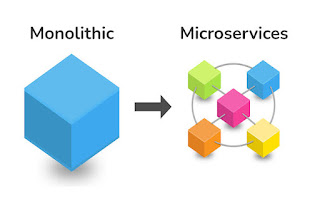
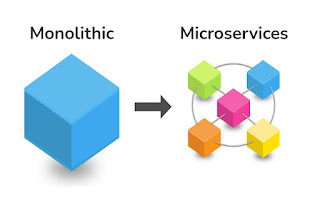
At its core, microservices architecture breaks down applications into smaller, independent services, each with its own set of functionalities. Unlike traditional monolithic applications, where all components are tightly integrated, microservices operate as standalone entities, communicating with each other through well-defined APIs. This decoupled approach promotes modularity, making it easier to develop, test, and deploy specific features independently.


Benefits of Microservices in SAP BTP:


1. Scalability: One of the key advantages of microservices lies in their ability to scale horizontally. This means that businesses can deploy multiple instances of a particular microservice based on the demand, ensuring optimal resource utilization and better performance during peak periods.


2. Agility: Microservices' independent nature allows for rapid development and deployment. Each microservice can be updated, tested, and rolled out separately, enabling continuous delivery and faster time-to-market for new features and enhancements.


3. Resilience: Microservices architecture fosters robustness and fault tolerance. As each microservice functions independently, a failure in one does not affect the entire system, reducing the risk of system-wide crashes and increasing the overall reliability of the application.


4. Technology Diversity: SAP BTP supports a diverse range of programming languages and tools, and microservices leverage this advantage fully. Businesses can choose the most suitable technology stack for each microservice, based on its specific requirements, ensuring optimal performance and flexibility.


Examples of Microservices in SAP BTP:


a. Order Management Service:

Consider a large e-commerce platform built on SAP BTP. The order management functionality can be implemented as a microservice. This service would handle tasks such as order creation, status updates, and cancellation independently, enabling the e-commerce platform to efficiently manage peak loads during sales events without affecting other services.


b. Payment Gateway Service:

In the same e-commerce platform, the payment processing functionality can be decoupled into a microservice. This service would interact with various payment providers, securely processing transactions without affecting other critical components of the application.


c. Inventory Management Service:

Another microservice in the e-commerce platform could handle inventory management. It would keep track of product stock levels, trigger alerts for low stock, and update product availability in real-time, ensuring seamless inventory control without disrupting other operations.


Implementing Microservices in SAP BTP:

To successfully implement microservices in SAP BTP, businesses should follow some best practices:


- Define Clear Service Boundaries: Identify distinct business functions and create well-defined boundaries for each microservice to ensure focused responsibilities and easy management.


- Use Effective API Management: Properly define and manage APIs to facilitate smooth communication between microservices and ensure secure data exchange.


- Implement Robust Monitoring and Logging: Regularly monitor and log microservices to identify potential performance bottlenecks and maintain the health of the entire application.

In my Next blog, I have given a use case for microservices in sap capm apps.

Microservices in SAP BTP offer a compelling approach to building modern applications, fostering agility, scalability, and resilience. By adopting this architecture, businesses can unlock new levels of innovation, enabling them to stay ahead in the competitive digital landscape. Embracing microservices in SAP BTP empowers organizations to optimize their digital transformation journey and drive success in the ever-evolving market.

Read more
SAPUI5 and OData: Choosing between v2 and v4 for Optimal Performance and Functionality

SAPUI5 and OData: Choosing between v2 and v4 for Optimal Performance and Functionality

Sanjo Thomas•11:28:00

In the world of SAPUI5 development, the integration of OData (Open Data Protocol) is crucial for seamless data communication between the front-end and back-end systems. OData comes in two major versions - OData v2 and OData v4, each offering distinct features and capabilities. As a SAPUI5 developer, understanding when to use OData v2 and when to opt for OData v4 is essential for creating efficient, performant, and future-proof applications. In this blog, we will explore the differences between these two versions and provide examples of consuming both OData v2 and OData v4 in SAPUI5 applications.


OData v2: The Robust and Mature Option

OData v2 is the older, more mature version of the protocol. It is based on RESTful principles and supports features like filtering, sorting, paging, and batch processing. One of the significant advantages of OData v2 is its widespread adoption and comprehensive support across SAP systems. Many SAP back-end services, including SAP Gateway, primarily use OData v2.


Use Cases for OData v2 in SAPUI5:

  • When your SAP back-end system exclusively supports OData v2.
  • For applications where real-time data updates are not a critical requirement.
  • When the data model is relatively simple and doesn't require complex navigation properties.

Example of Consuming OData v2 in SAPUI5:

// Create a new ODataModel for OData v2
const oModel = new sap.ui.model.odata.v2.ODataModel("/sap/opu/odata/sap/Your_OData_Service/", {
    useBatch: false // Set this to true for batch processing support
});
// Bind data to a table
const oTable = new sap.ui.table.Table({
    visibleRowCount: 10,
    selectionMode: sap.ui.table.SelectionMode.Single,
    rows: "{/EntitySet}"
});
oTable.addColumn(new sap.ui.table.Column({
    label: new sap.ui.commons.Label({ text: "ID" }),
    template: new sap.ui.commons.TextView().bindProperty("text", "ID"),
    sortProperty: "ID",
    filterProperty: "ID"
}));
// ... other columns ...
oTable.setModel(oModel);


OData v4: The Modern and Efficient Approach

OData v4, as the more recent version, is designed with a focus on performance, simplicity, and compatibility with modern web standards. It introduces several improvements over v2, such as improved query handling and server-driven paging. OData v4 is the recommended choice for new SAPUI5 applications, especially if your back-end supports it.

Use Cases for OData v4 in SAPUI5:

For new applications or when planning a major overhaul of existing ones.
When your SAP back-end system supports OData v4 or offers a more extensive OData v4 service.
Applications requiring advanced features like deep insert, transient entities, or server-driven paging.

Example of Consuming OData v4 in SAPUI5:

// Create a new ODataModel for OData v4
const oModel = new sap.ui.model.odata.v4.ODataModel("/sap/s4hana/sap/opu/odata/sap/Your_OData_Service/", {
    synchronizationMode: "None" // Set this to "None" for better performance
});

// Bind data to a table
const oTable = new sap.ui.table.Table({
    visibleRowCount: 10,
    selectionMode: sap.ui.table.SelectionMode.Single,
    rows: {
        path: "/EntitySet",
        parameters: {
            $$groupId: "group1", // Use $$groupId for separate group processing
            $$ownRequest: true // Set this to true for individual server requests per table
        }
    }
});

oTable.addColumn(new sap.ui.table.Column({
    label: new sap.ui.commons.Label({ text: "ID" }),
    template: new sap.ui.commons.TextView().bindProperty("text", "ID"),
    sortProperty: "ID",
    filterProperty: "ID"
}));

// ... other columns ...

oTable.setModel(oModel);

Using OData v4 in CAPM Apps:

OData v4 is a modern version of the Open Data Protocol, and it plays a significant role in CAPM (Centralized Application Lifecycle Management) applications. CAPM apps are designed to streamline the process of managing applications throughout their lifecycle, from development to deployment and maintenance. Here's a short note on using OData v4 in CAPM apps:

  • Improved Performance: OData v4 offers better performance compared to its predecessor, v2. It supports server-driven paging, enabling efficient data retrieval, which is crucial in CAPM apps that deal with a large volume of application-related data.
  • Advanced Query Handling: OData v4 introduces several enhancements in query handling, making it easier to retrieve specific data sets and perform complex filtering and sorting operations. This feature simplifies data processing in CAPM apps, allowing developers to fetch relevant information effectively.
  • Compatibility with Modern Web Standards: OData v4 aligns well with modern web standards and technologies. This compatibility makes it suitable for building CAPM apps that can interact seamlessly with various front-end frameworks and platforms.
  • Support for Transient Entities: In CAPM apps, there are instances where entities may exist temporarily for processing and then discarded. OData v4 supports transient entities, which allows developers to work efficiently with temporary data, simplifying the app's overall design.
  • Simplified Code: OData v4's improved syntax and more streamlined URL conventions lead to simpler and cleaner code. This results in easier maintenance and development of CAPM apps, reducing the risk of errors and improving code readability.
  • Scalability: CAPM apps often deal with multiple applications and their respective data sets. OData v4's scalability ensures that the apps can handle growing data demands without compromising performance or stability.
  • Support for Associations and Navigation Properties: OData v4 allows developers to model associations between different entities and utilize navigation properties. In CAPM apps, this feature enables easy navigation through related data, enhancing the user experience.
  • Security Considerations: When working with CAPM apps, security is of utmost importance. OData v4 supports industry-standard authentication and authorization mechanisms, ensuring that data is accessed only by authorized users.

Choosing the right version of OData is vital for creating efficient and high-performing SAPUI5 applications. OData v2 offers a robust and mature option with comprehensive support, while OData v4 provides modern features and better performance. By understanding the unique use cases and advantages of each version, SAPUI5 developers can make informed decisions and build applications that align perfectly with their requirements and the capabilities of their SAP back-end systems.

Read more
 SAP Modules List Overview: Unlocking the Potential of SAP's Comprehensive Business Solution

SAP Modules List Overview: Unlocking the Potential of SAP's Comprehensive Business Solution

Sanjo Thomas•23:49:00

SAP (Systems, Applications, and Products) is a leading provider of enterprise resource planning (ERP) software, offering a wide range of modules to cater to diverse business needs. Each SAP module represents a specific business function, enabling organizations to integrate and streamline their processes for enhanced efficiency. In this blog, we will provide an overview of SAP modules and explore the various options available to businesses seeking to leverage SAP's powerful capabilities.


What is the Overview of SAP Modules?

SAP modules are self-contained units of the SAP ERP system, each designed to handle specific business processes or functional areas. The modules operate as interconnected components, facilitating seamless data flow and enabling organizations to maintain a unified view of their operations.

At the core of SAP lies the SAP Central Component (SAP ECC), which serves as the foundation for all modules. The ECC houses data shared among different modules and provides a cohesive platform for organizations to manage their resources efficiently. Additionally, SAP offers cloud-based solutions, such as SAP S/4HANA, which provide advanced capabilities, real-time analytics, and streamlined processes for businesses embracing digital transformation.

What Modules are Available in SAP?

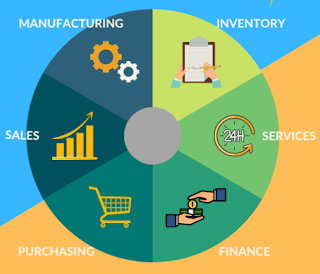
SAP boasts an extensive suite of modules, each tailored to specific business needs. Some of the key modules offered by SAP include:

FUNCTIONAL MODULES

Finance (FI): SAP FI module is designed to manage financial accounting tasks, such as general ledger, accounts payable, accounts receivable, asset accounting, and financial reporting.

Controlling (CO): The CO module complements the FI module by handling cost accounting, profitability analysis, internal orders, and other controlling functions to monitor and optimize costs.

Sales and Distribution (SD): SAP SD module facilitates sales processes, including order management, pricing, billing, shipping, and credit management.

Materials Management (MM): SAP MM module manages procurement and inventory processes, encompassing purchasing, material planning, stock management, and vendor evaluation.

Production Planning (PP): The PP module supports production planning and control, including demand forecasting, master production scheduling, and shop floor control.

Human Capital Management (HCM): SAP HCM module addresses human resource functions, such as payroll, personnel administration, time management, and talent development.

Customer Relationship Management (CRM): SAP CRM module focuses on managing customer relationships, sales, marketing, and customer service for better customer engagement.

Supplier Relationship Management (SRM): The SRM module streamlines procurement processes with suppliers, contract management, supplier evaluation, and supplier collaboration.

Business Intelligence (BI): SAP BI module enables data analysis and reporting, providing insights to make informed business decisions.

Supply Chain Management (SCM): SAP SCM module optimizes supply chain operations, encompassing demand planning, supply network planning, and logistics execution.

Quality Management (QM): The QM module ensures adherence to quality standards through quality planning, inspection, and control of goods and processes.

Plant Maintenance (PM): SAP PM module handles plant maintenance tasks, such as equipment management, maintenance planning, and work order processing.

Project System (PS): SAP PS module aids in project planning, execution, monitoring, and controlling, facilitating effective project management.

Governance, Risk, and Compliance (GRC): The GRC module assists in managing risk, compliance, and governance across the organization.

Environment, Health, and Safety (EHS): SAP EHS module focuses on environmental compliance, occupational health, and safety management.

TECHNICAL MODULES

Technical Modules:

ABAP (Advanced Business Application Programming)

Basis (System Administration)

SAP NetWeaver (Integration and Application Platform)

SAP Solution Manager (Application Lifecycle Management)

SAP Cloud Platform (PaaS for Developing Custom Applications)

SAP Data Services (Data Integration and Transformation)

SAP Fiori (User Experience and Design)

SAPUI5 (Web Development Toolkit for SAP Fiori)

SAP HANA (In-Memory Database and Platform)

The technical modules play a crucial role in supporting and maintaining the SAP system infrastructure, ensuring seamless integration, data management, and development of custom applications.

SAP modules offer a comprehensive suite of solutions to address various business functions, enabling organizations to integrate and optimize their operations. From functional modules that handle finance, sales, and supply chain to technical modules supporting development, data management, and user experience, SAP's ecosystem caters to diverse industry needs. By leveraging SAP's robust suite of modules, businesses can gain a competitive edge in the ever-evolving marketplace and embrace the full potential of SAP's intelligent ERP solution.


Read more
What is Transaction Code (T-code) in SAP? A Comprehensive Guide

What is Transaction Code (T-code) in SAP? A Comprehensive Guide

Sanjo Thomas•23:31:00

In the world of SAP (Systems, Applications, and Products), transaction codes, commonly known as T-codes, play a crucial role in executing various business processes. For SAP users, T-codes act as shortcuts to access specific transactions or tasks within the system. In this blog, we will explore what T-codes are, their significance in SAP, how to find them, and why SAP relies on T-codes for seamless operations.


What is T-code Transaction Code?

A Transaction Code, often abbreviated as T-code, is an alphanumeric identifier used in SAP to accessspecific transactions or functions with just a few keystrokes. It serves as a shortcut that allows users to bypass complex navigation paths and directlyreach the desired functionality. T-codes streamline the user experience, saving time and effort in accessing various SAP processes.

What is the T-code in SAP?

In SAP, the T-code acts as a unique identifier for each transaction, report, or task that can be executed within the system. The code is composed of letters and numbers and is typically four or five characters long. For example, T-code "MM01" is used for creating a material master, and "VA01" is used to create a sales order. Each T-code is associated with a specific function or process, ensuring users can quickly access the relevant task without navigating through various menus.

How do I find the T-code in SAP?

Finding the right T-code is essential for efficient SAP navigation. Several methods can be employed to locate the desired T-code:

SAP Easy Access Screen: The SAP Easy Access screen is the primary entry point for most users. It displays a menu with various modules such as Finance (FI), Controlling (CO), Sales and Distribution (SD), Material Management (MM), and more. Users can explore the menu to find relevant transactions or simply enter a keyword in the search bar to view matching T-codes.

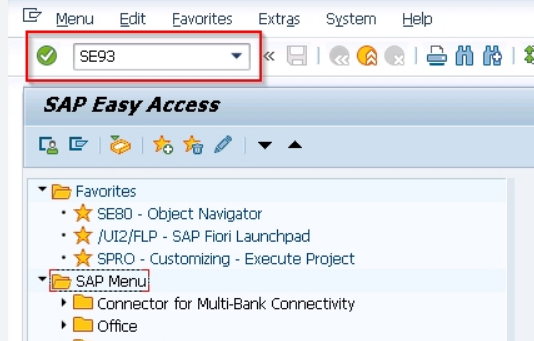
Using the "SE93" Transaction: The "SE93" transaction itself is used to manage transaction codes in SAP. By entering "SE93" in the command field and pressing Enter, users can access a screen where they can either view existing T-codes or create new ones. It also provides details about each T-code, including its description and associated program.

SAP Help Documentation: SAP offers extensive documentation, including online help and user guides. Users can refer to the SAP help portal or press "F1" on their keyboard while on a specific screen to access context-sensitive help. This resource can guide users to relevant T-codes and provide insights into their usage.

Favorites and Recently Used Transactions: SAP allows users to add frequently used T-codes to their favorites list. Additionally, users can find their recently executed transactions by clicking on the "Recent Transactions" option in the SAP menu.

Why does SAP use T-codes?

The implementation of T-codes in SAP offers several significant advantages that enhance user experience and system efficiency:

Enhanced User Productivity: T-codes provide a direct and efficient means of accessing specific transactions, enabling users to perform tasks swiftly. This streamlined approach reduces the time spent navigating through menus and screens, boosting overall productivity.

Consistency and Standardization: SAP T-codes follow a consistent naming convention, making it easier for users to identify and remember them. This standardization ensures a uniform approach across the organization, leading to reduced errors and better process control.

Simplified Training: SAP T-codes simplify the training process for new users. Instead of learning complex menu structures, employees can quickly grasp the relevant T-codes for their roles, enabling them to become proficient in specific tasks faster.

Transaction Authorization: SAP's access control is often based on T-codes, allowing organizations to manage user permissions at a granular level. Administrators can assign or restrict access to specific T-codes, ensuring data security and compliance.


Seamless System Navigation: In SAP ERP systems, which encompass a vast array of functionalities, finding the right task quickly is essential. T-codes offer a seamless navigation experience, even in complex and extensive SAP landscapes.


Let's take an example to understand the significance of T-codes better:

Imagine you are a procurement specialist in a large manufacturing company, responsible for creating purchase orders to procure raw materials. Without T-codes, the process would involve clicking through various SAP menu paths, such as Material Management (MM) -> Purchasing -> Purchase Order -> Create, and then specifying additional details like vendor information, material codes, quantities, and delivery dates.

However, with T-codes, this process becomes much more straightforward. You can use the T-code "ME21N," where "ME" indicates the Material Management module and "21" refers to the Purchase Order transaction. By entering "ME21N" in the SAP command field and hitting Enter, the purchase order creation screen opens directly, ready for you to input the required information. This saves valuable time and eliminates the need for extensive navigation, allowing you to focus on more critical tasks.

Furthermore, T-codes in SAP adhere to a consistent naming convention, making them intuitive and easy to remember. For instance, T-codes for material-related transactions often begin with "MM," while those for sales-related activities start with "VA."

Another significant advantage of T-codes is their role in enhancing security and access control. SAP administrators can assign specific T-codes to users based on their roles and responsibilities. This ensures that employees can only perform tasks relevant to their job functions, safeguarding sensitive data and preventing unauthorized actions.

In addition to these benefits, SAP users can create a personalized list of favorite T-codes, further expediting access to frequently used transactions. The system also keeps track of recently executed T-codes, enabling quick retrieval of past activities.

In conclusion, T-codes are a fundamental aspect of SAP's user interface design, driving efficiency and simplicity in the execution of tasks. By providing direct access to specific transactions, adhering to naming standards, and offering enhanced security features, T-codes significantly contribute to an optimized SAP experience. Whether you are a seasoned SAP professional or a new user, understanding and leveraging T-codes can greatly enhance your productivity and effectiveness within the SAP ecosystem.


Read more
Unleashing the Power of SAP Annotations for Smart Tables

Unleashing the Power of SAP Annotations for Smart Tables

Sanjo Thomas•06:48:00

SAP annotations play a crucial role in enhancing the functionality and user experience of applications built on the SAP platform. In this blog, we will explore the significance of SAP annotations, specifically focusing on their application in Smart Tables. These annotations serve as essential metadata, enabling developers to define and modify the behavior of Smart Tables, making them more intelligent and user-friendly. Let's delve into the world of SAP annotations for Smart Tables and discover how they can elevate your application development process.


What are Common Metadata Annotations?

Metadata annotations are essential pieces of information embedded within the data structure that provide additional context and instructions. They help applications understand and interpret data effectively. Some common metadata annotations used in SAP are:


1. @OData.annotation: This annotation is used to specify the OData metadata extensions. It allows developers to add custom annotations to the OData service.

2. @UI: The @UI annotation is fundamental when dealing with user interfaces. It allows developers to influence the rendering and behavior of UI elements like Smart Tables.

3. @Common.Label: This annotation provides a human-readable label for the associated entity, property, or action, making it easier for users to understand the application's content.

4. @Capabilities: These annotations are used to expose additional capabilities of the data model, like sorting, filtering, and pagination.


What is Annotation in SAP OData?

In SAP, OData is a protocol used to expose data from various sources in a standardized way. Annotations in SAP OData are used to enrich the data model with additional metadata that goes beyond the basic schema definition. They are applied to entities, properties, and navigation properties, allowing developers to extend the behavior and rendering of these elements.


With annotations, developers can specify custom sorting orders, define navigation targets, set visibility conditions, and even implement data validations. In the context of Smart Tables, annotations enable developers to enhance the table's functionality and appearance without modifying the underlying data model.


The Purpose of UI Annotations in CDS View:

Core Data Services (CDS) is a modeling technique in SAP that allows developers to define semantically rich data models. Within CDS views, UI annotations are used to influence the rendering and behavior of user interfaces, including Smart Tables.


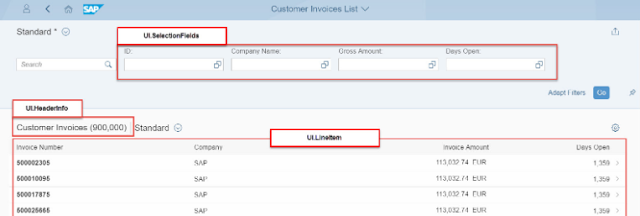
1. @UI.lineItem: This annotation is used to specify which fields should be displayed as line items in the Smart Table, providing a concise overview of the data.

2. @UI.selectionField: Developers use this annotation to mark fields as selection fields, which enables users to filter data based on those fields within the Smart Table.

3. @UI.facet: This annotation is used to group related fields together within the Smart Table, organizing the data in a meaningful way.

4. @UI.filterField: By using this annotation, developers can enable filtering on specific fields, enhancing data exploration capabilities for end-users.


Examples of SAP Annotations in Smart Tables:

Let's explore some practical examples of how SAP annotations can be applied to Smart Tables to enhance their functionality:

1. Custom Sorting: Assume we have a Smart Table displaying sales data with various columns, including "Revenue" and "Profit." By applying the @Capabilities.SortRestrictions annotation, developers can allow users to sort the table data based on these columns in ascending or descending order.

2. Conditional Formatting: With the @UI.dataPoint annotation, developers can apply conditional formatting to the "Revenue" field, highlighting it in red if it falls below a predefined threshold, drawing immediate attention to potential issues.

3. Navigation Targets: By utilizing the @UI.lineItem and @UI.identification annotations, developers can specify which fields serve as navigation targets, enabling users to navigate to related entities or detail pages directly from the Smart Table.


SAP annotations for Smart Tables open up a world of possibilities in terms of customizing and enriching the user experience. From defining custom sorting to enabling filtering and navigation, annotations empower developers to craft highly interactive and intelligent applications. By embracing the power of annotations, developers can create applications that not only meet business requirements but also delight end-users with a seamless and intuitive experience. So, why wait? Dive into the realm of SAP annotations and elevate your Smart Tables to the next level!

Read more
Sap Rap Interview questions Part 4

Sap Rap Interview questions Part 4

Sanjo Thomas•02:06:00

In this blog, I have listed most common and latest interview questions related to SAP RAP ABAP. I have divided these into multiple parts: 


  76. How do you handle optimistic locking conflicts in SAP RAP when saving draft changes?

Optimistic locking conflicts in SAP RAP are handled automatically during the save process. When a conflict occurs, the framework detects the changes made by other users and prompts the current user to resolve the conflict before proceeding with the save.

77. What is the purpose of the @ObjectModel.virtualRoot annotation in SAP RAP?

The @ObjectModel.virtualRoot annotation is used to define a virtual root entity in a BOPF object. It allows developers to include additional context data or behavior in the root entity without directly modifying the actual database tables.

78. How do you handle data validation for specific fields based on user input in SAP RAP applications?

Data validation for specific fields can be implemented using the BOPF validation framework, which allows developers to define custom validation rules based on user input and entity data.

79. Can you explain the use of the @DefaultAggregation annotation in SAP RAP CDS views?

The @DefaultAggregation annotation allows you to define default aggregations (e.g., SUM, AVERAGE, MAX) for specific fields in CDS views, making it easier to calculate aggregated values in analytical queries.

80. How do you handle custom error messages and error handling in SAP RAP applications?

Custom error messages can be defined and raised using BOPF error handling classes. Developers can handle errors based on specific conditions or error types to provide more informative feedback to end-users.

81. What is the role of SAP RAP Business Object Generator (BOB)?

The SAP RAP Business Object Generator (BOB) is a tool that automates the creation of BOPF objects and corresponding CDS views from a data model defined in a Data Definition Language (DDL) file.

82. Can you explain the concept of binding switch in SAP RAP?

Binding switch allows developers to control the behavior of an association at runtime, enabling dynamic association resolutions based on specific conditions.

83. How do you handle soft and hard deletes in SAP RAP applications?

Soft deletes can be implemented using draft handling, allowing users to deactivate entities without permanently deleting them. Hard deletes can be executed manually or using custom logic when necessary.

84. What are the key steps involved in upgrading SAP RAP applications to newer versions or releases?

The key steps involve analyzing the changes introduced in the new version, adapting custom code and behavior, adjusting data models, and thoroughly testing the upgraded application.

85. How do you handle concurrency conflicts when multiple users are editing the same draft in SAP RAP applications?

Concurrency conflicts are detected and managed automatically during the save process. The framework compares the draft data with the active version to ensure consistency and avoid data inconsistencies.

86. How do you handle mass data operations like data imports and exports in SAP RAP applications?
Mass data operations can be handled using SAP Data Services, Data Migration Cockpit (DMC), or custom programs to handle data imports and exports efficiently.

87. Can you explain the concept of event publishing and event consumption in SAP RAP?
Event publishing allows an application to trigger events that other components or applications can listen to and respond to (event consumption). This enables decoupled communication between different parts of the application.

88. How do you implement authorization checks for custom actions in SAP RAP applications?
Authorization checks for custom actions can be performed by implementing custom authorization classes that are triggered when the action is executed.

89. What are the best practices for implementing error handling and logging in SAP RAP applications?
Best practices include using structured exception classes, logging frameworks like SLG1, and providing meaningful error messages to guide users on what went wrong.

90. How do you implement custom authorization logic based on field-level security in SAP RAP applications?
Field-level security can be implemented using CDS authorization annotations (@AccessControl) and custom authorization classes to control which fields users can access based on their roles and authorizations.

91. What are the considerations for building SAP RAP applications that support multiple backend database platforms?
When building applications for multiple backend database platforms, it is crucial to consider database-specific SQL constructs and ensure that your data model is compatible with all targeted databases.

92. How do you handle attachments and document management in SAP RAP applications?
Attachments and document management can be handled using SAP Document Management System (DMS) or other external content repositories to store and manage documents associated with entities.

93. Can you explain the use of BOPF qualifiers and contexts in SAP RAP?
BOPF qualifiers allow you to differentiate between multiple instances of the same BOPF object in different contexts. Contexts are used to manage different variations or scenarios of the same business object.

94. How do you perform data migration when transitioning from traditional SAP ECC to SAP S/4HANA with SAP RAP?
Data migration from SAP ECC to SAP S/4HANA with SAP RAP can be done using SAP Data Services, SAP S/4HANA Migration Cockpit, or other migration tools.

95. What are the best practices for ensuring the security of SAP RAP applications?
Best practices include implementing proper authorizations, securing communication channels with SSL, implementing input validation, and using secure coding practices.

96. How do you handle data synchronization between different SAP RAP applications or systems?
Data synchronization between SAP RAP applications or systems can be achieved through integration scenarios using OData services, RFCs, or other middleware technologies like SAP Cloud Platform Integration.
97. Can you explain the role of Business Rules Framework plus (BRFplus) in SAP RAP applications?
BRFplus is a rule-based framework that allows developers to define and manage business rules independently from the application code. It can be used in SAP RAP applications to implement complex business logic and decision-making.
98. How do you manage the transport of SAP RAP applications between different systems?
SAP RAP applications can be transported using standard SAP transport requests, which include the relevant CDS views, BOPF objects, behavior definitions, and other relevant artifacts.
99. What are the considerations for performance optimization when using SAP RAP applications on SAP HANA?
To optimize performance on SAP HANA, consider leveraging HANA-specific features like CDS table functions, using native SQL views, and minimizing round trips to the database.
100. How do you handle integration with non-SAP systems in SAP RAP applications?
Integration with non-SAP systems can be achieved using RESTful APIs, JSON, or other standard communication protocols. SAP Gateway can act as the mediator for integration with external systems.

Read more